The quiet CRM
for the people
running the bay.
Jobs, bookings, invoices, vehicles, and the messages that go with them, in one app the front desk, the bay, and the office can all open. No dashboards no-one looks at. No upsell on the homepage.
Everything, done properly.
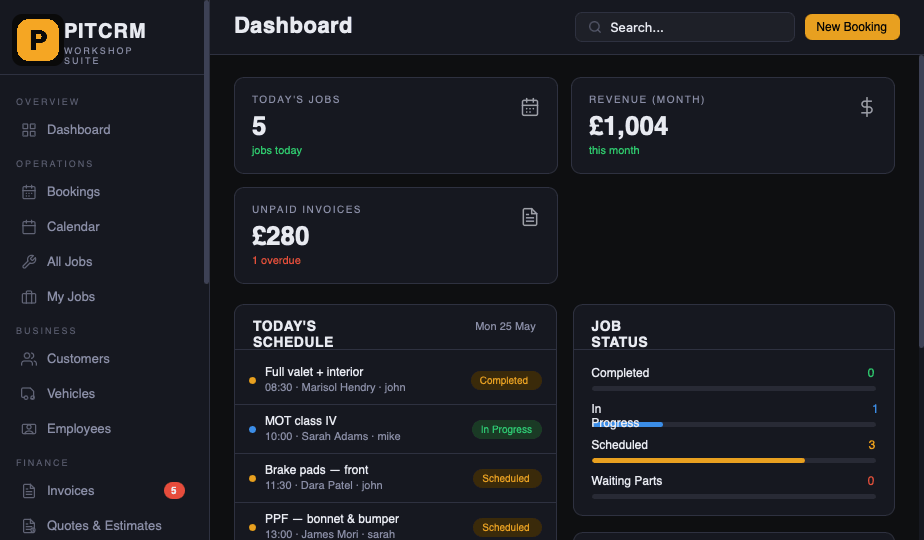
PitCRM is the workshop schedule, the invoice book, the customer log, the deposits and the rota, joined up. The kind of software the office staff thank you for, and the techs don't curse at. It opens on a phone in the bay, an iPad on the front desk, or a computer in the office. The same data, everywhere.
The diary,
the bay, the day.
Drag a booking onto the calendar. Assign a tech. Mark it done. The schedule is the front desk's home screen and the workshop's whiteboard. Same view, both audiences.
- Day, week and bay views
- Online booking page, branded
- SMS / email reminders, automated
- Reg-plate lookup via DVLA
Invoices and
quotes, in seconds.
Quote, invoice, take card payment, mark paid. Email the PDF straight from the job. Late payers get a quiet nudge on day 8 and a firmer one on day 15. You set the words.
- VAT-ready PDF invoices
- Stripe payments built in
- Auto-sync to Xero or QuickBooks
- One-tap chase for overdue
Every car,
every conversation.
Every customer has a single page: their vehicles, their job history, every SMS, email and WhatsApp you've sent them. No more "what did we charge them last time?" rummages.
- Multi-vehicle customer records
- Service history, parts & labour
- SMS, email & WhatsApp threading
- Inspection photos & damage maps
Money down,
before the spanner.
Take a deposit the moment they book, straight into your own Stripe account, never ours. The slot's only held once they've paid. Cancel late and you decide: refund it or keep it, in a tap. Fewer empty bays, fewer chancers.
- Deposits to your own Stripe account
- Slot held only once it's paid
- Refund or retain on cancellation, in-app
- Credited to the final invoice automatically
Who's in,
who's on what.
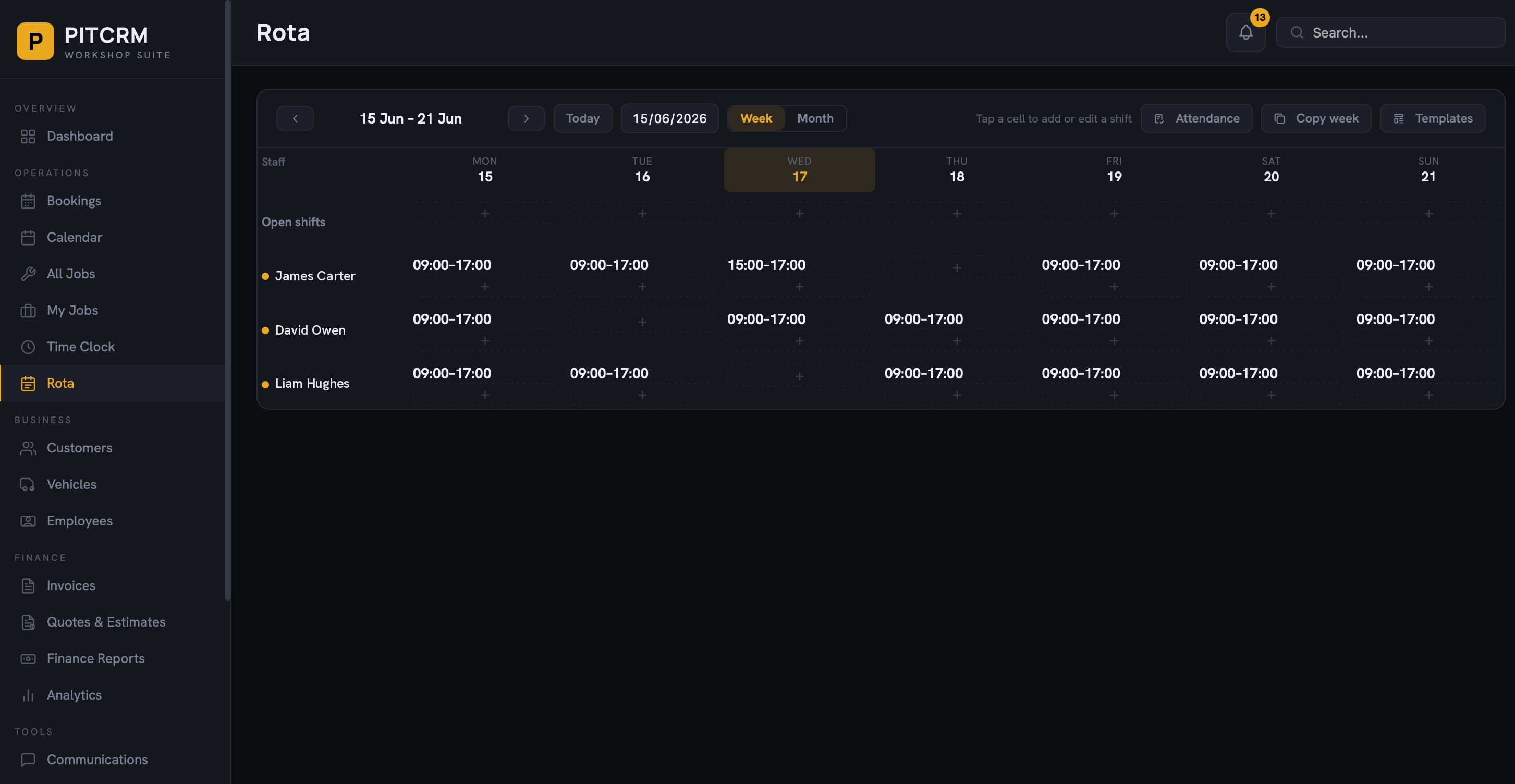
Build the week's rota in a grid. Drop in shifts, reuse templates, copy last week in a tap. Staff clock in and out from their own phone, breaks and all. Then see who turned up against who was meant to: planned versus actual, no spreadsheet.
- Weekly rota with shift templates
- Clock in/out & breaks from any phone
- Planned-vs-actual attendance
- Roles, open shifts, copy-week
Every dent,
on the record.
The tech walks the car and taps the damage onto a diagram before the keys come off the hook. Photos attach. The customer signs on the iPad and gets a copy. A dispute three weeks later meets a timestamped record, not a memory.
- Tap-to-mark damage maps
- In-app photos, EXIF kept
- Customer signature on the iPad
- PDF report attaches to the job
A Tuesday, start to finish.
No setup epic, no twelve-step onboarding video. Here's the actual shape of a day once it's running: one car, from the phone ringing to the money in the bank. Tap a step.
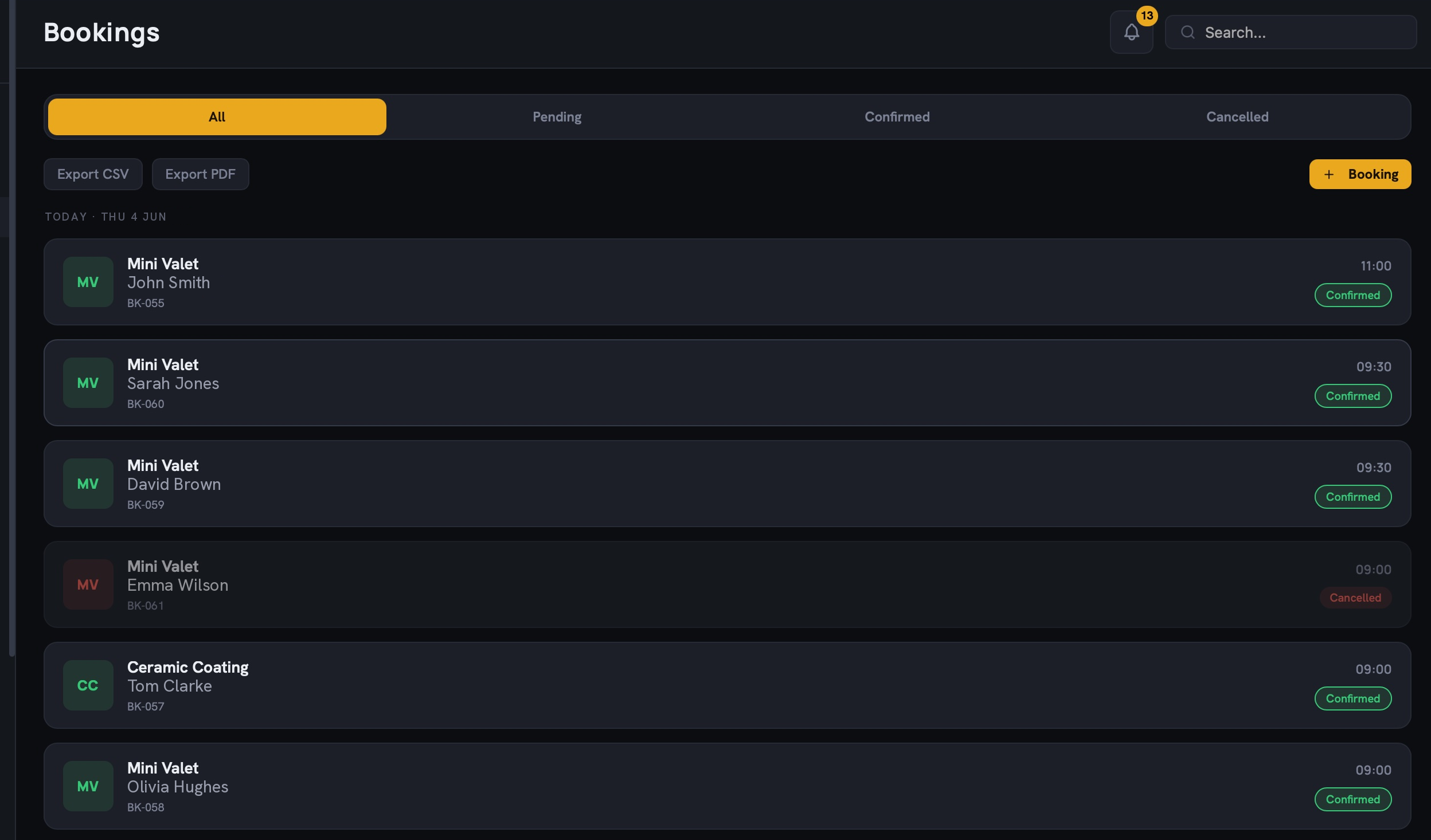
Online booking or a phone call. It lands on the right day with the vehicle details already filled.
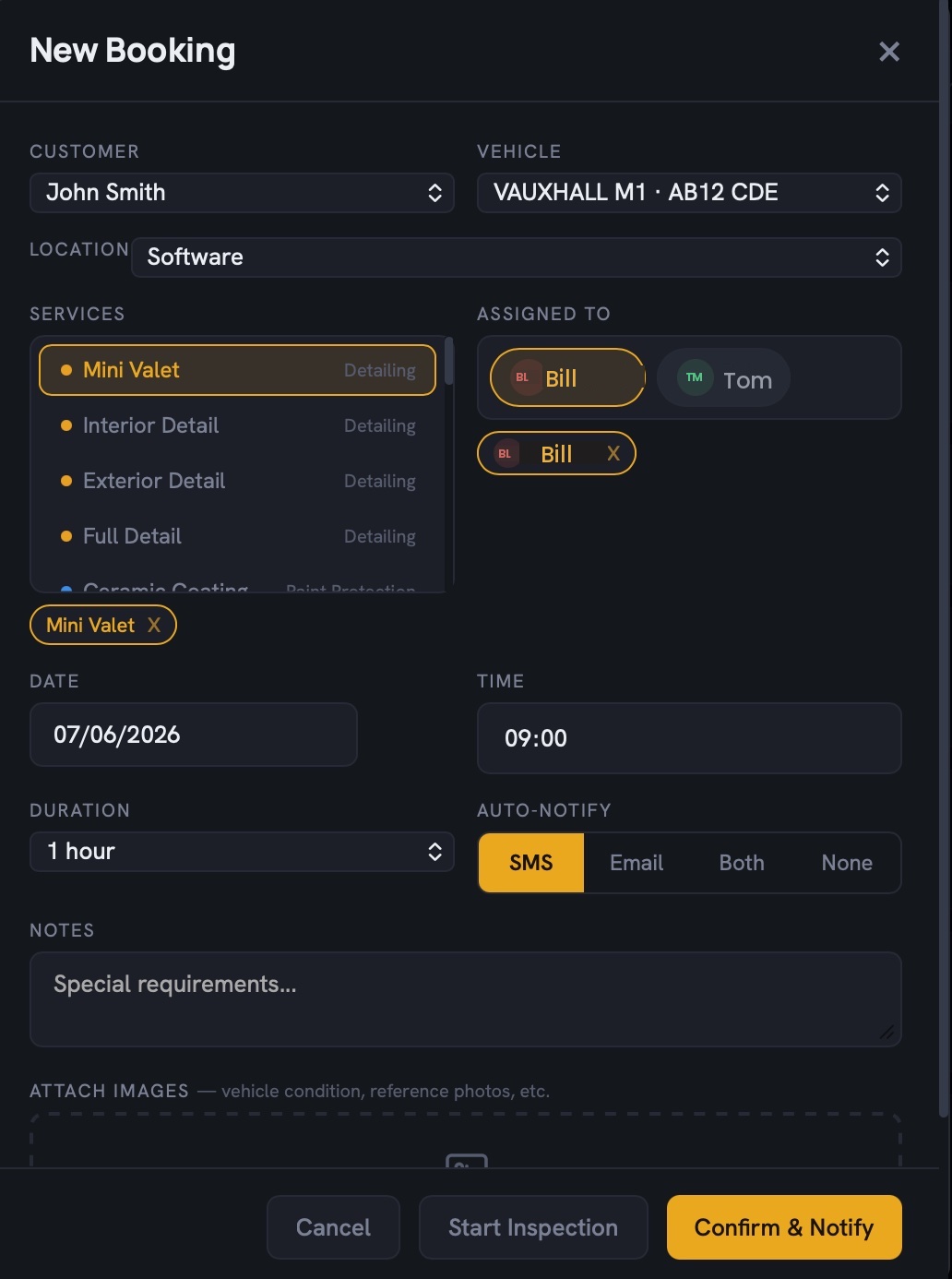
Set the services and assign the tech. It lands on their screen straight away.
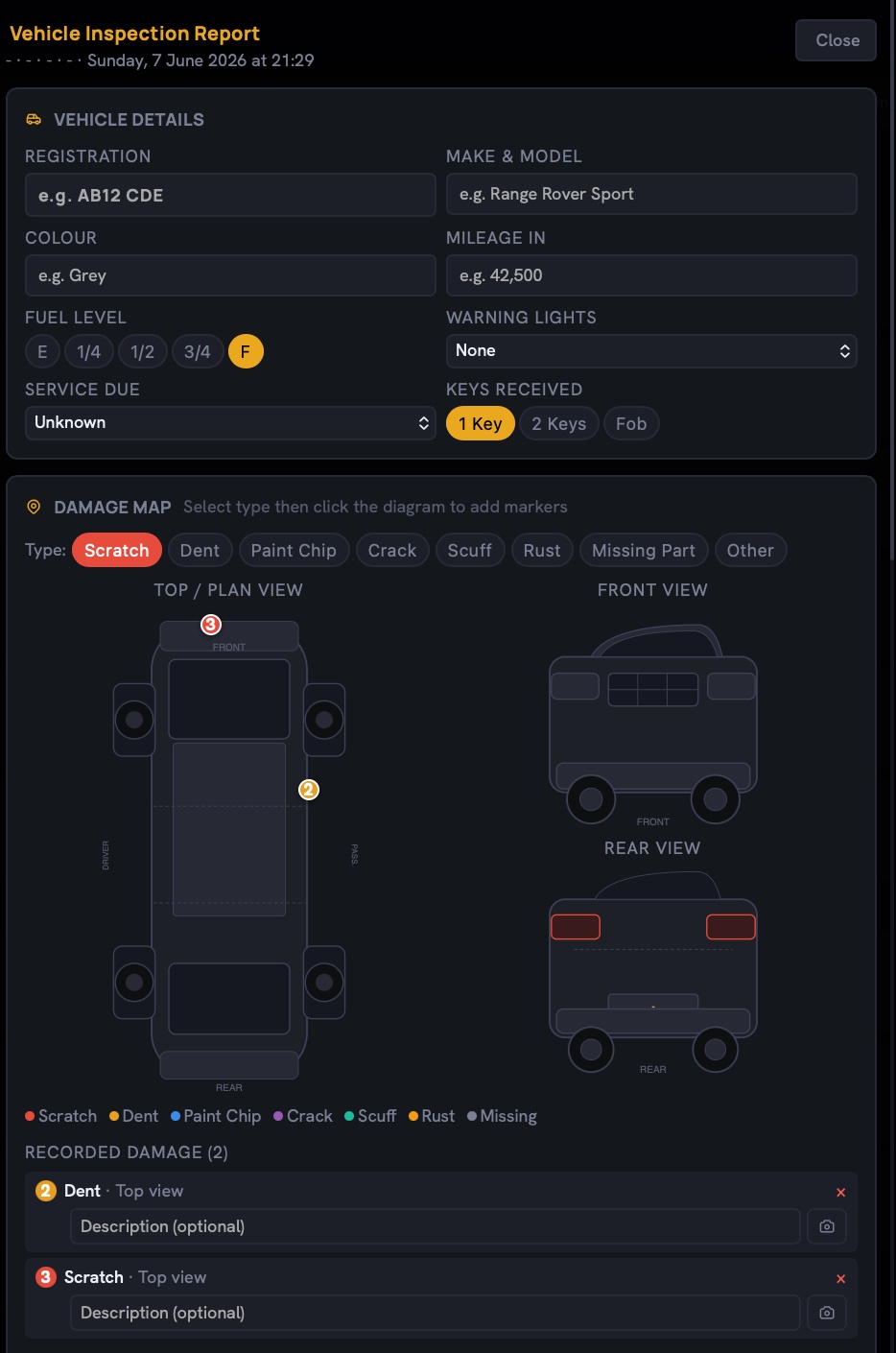
Walk the car, tap the damage onto the diagram, attach photos, all before a spanner's lifted.
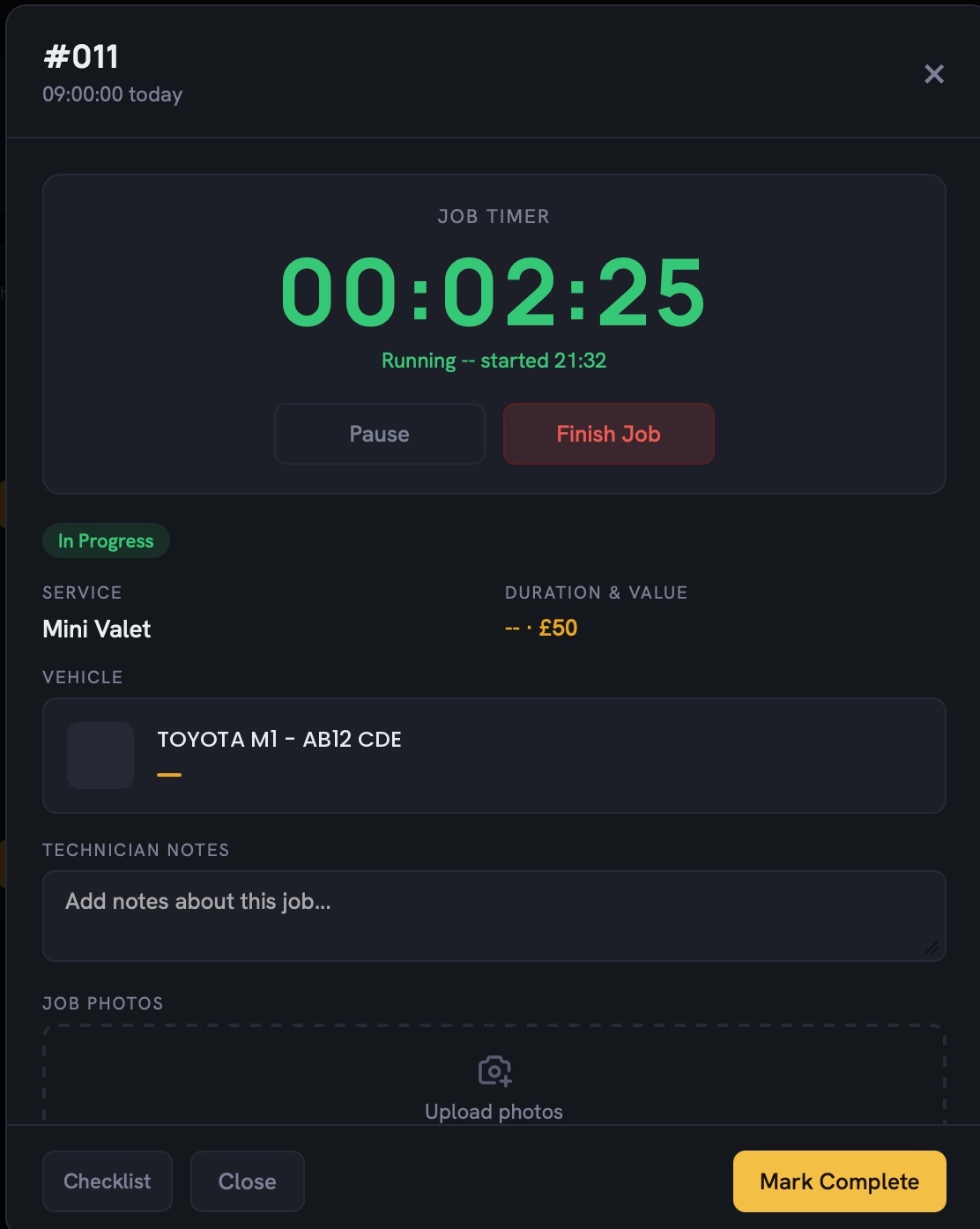
Timer running, parts and labour logged, photos against the job as the work happens.
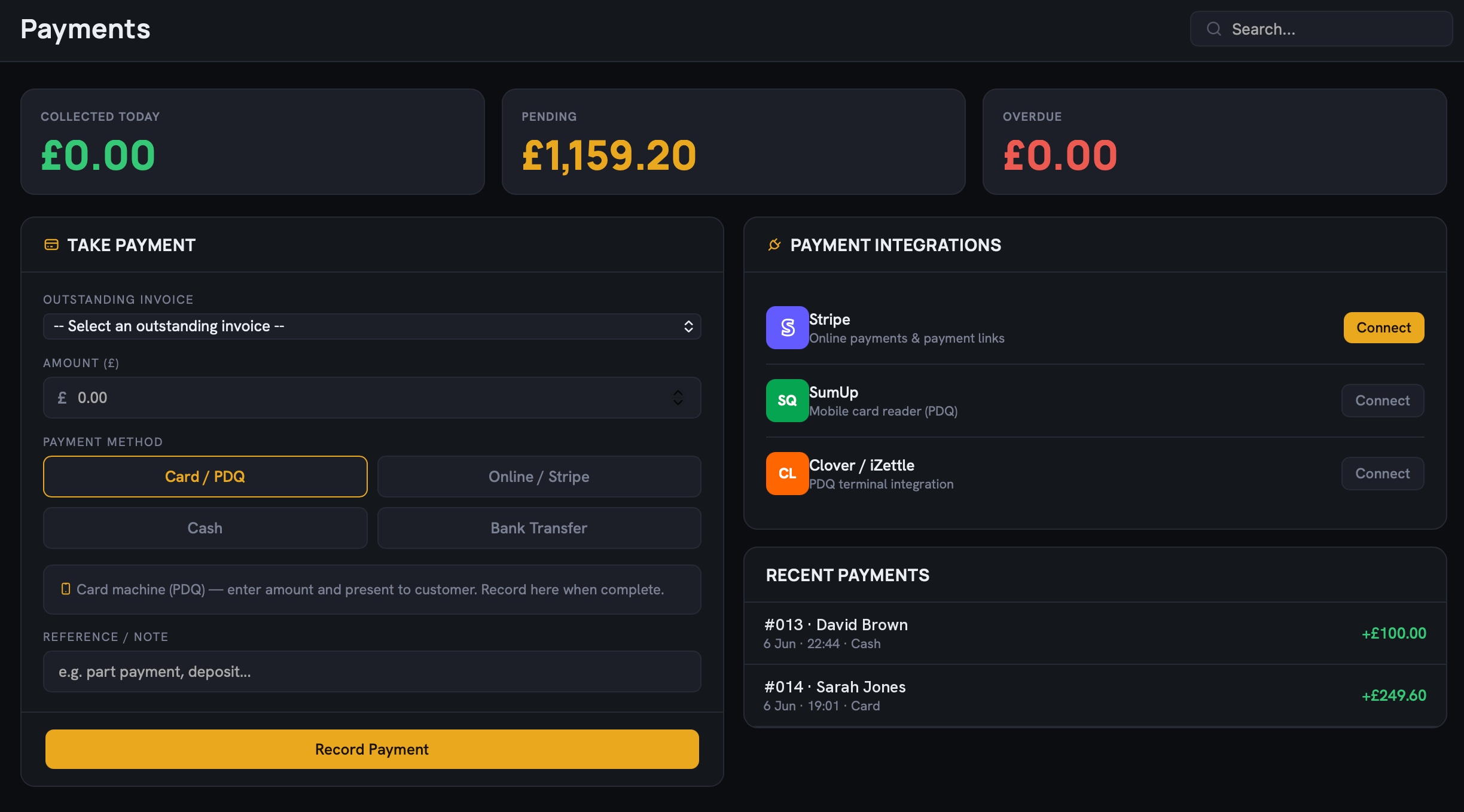
Turn the job into an invoice and take the card, full amount or a part payment, in a couple of taps.
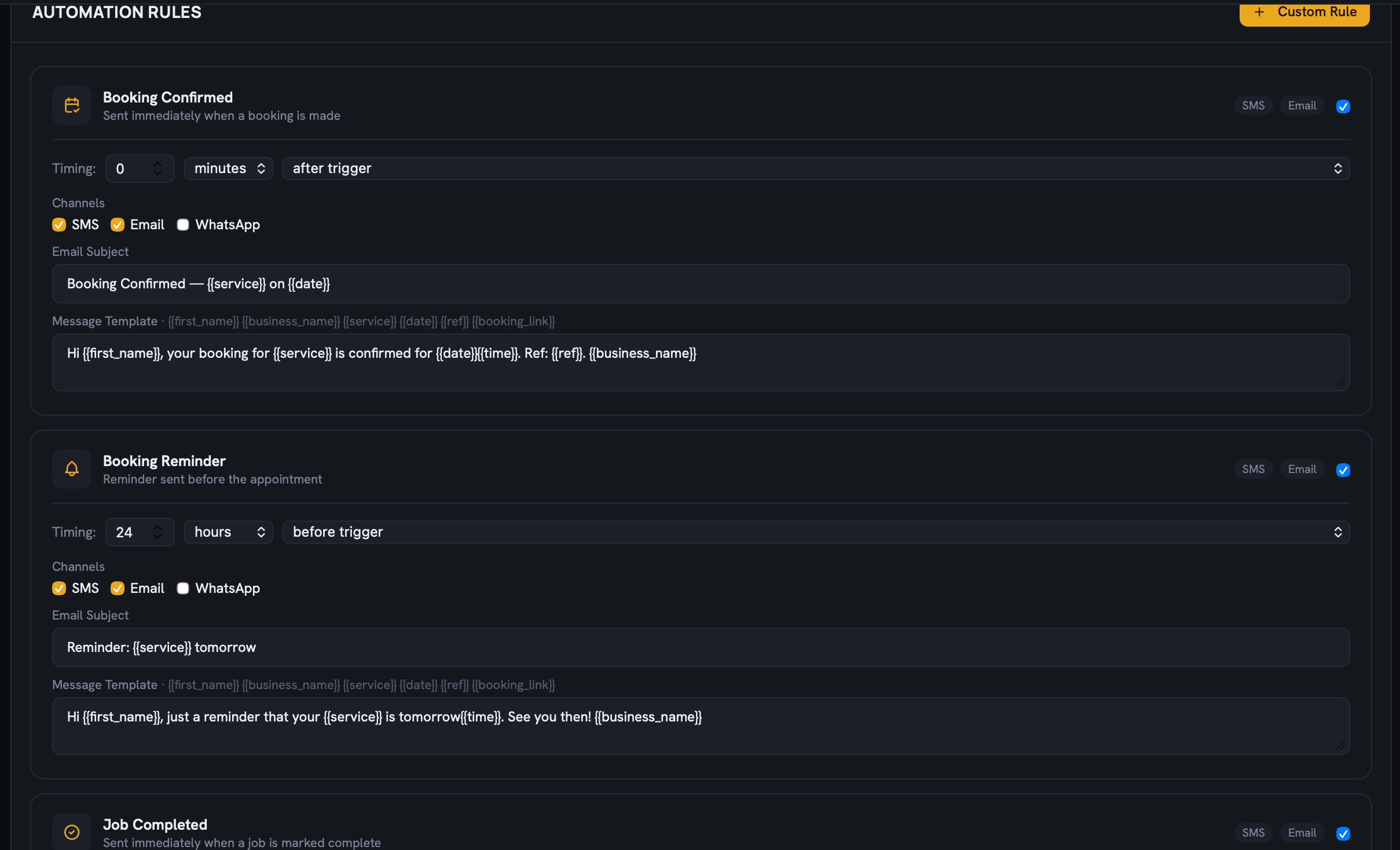
Unpaid invoices get a polite nudge, then a firmer one, in your words, sent for you.
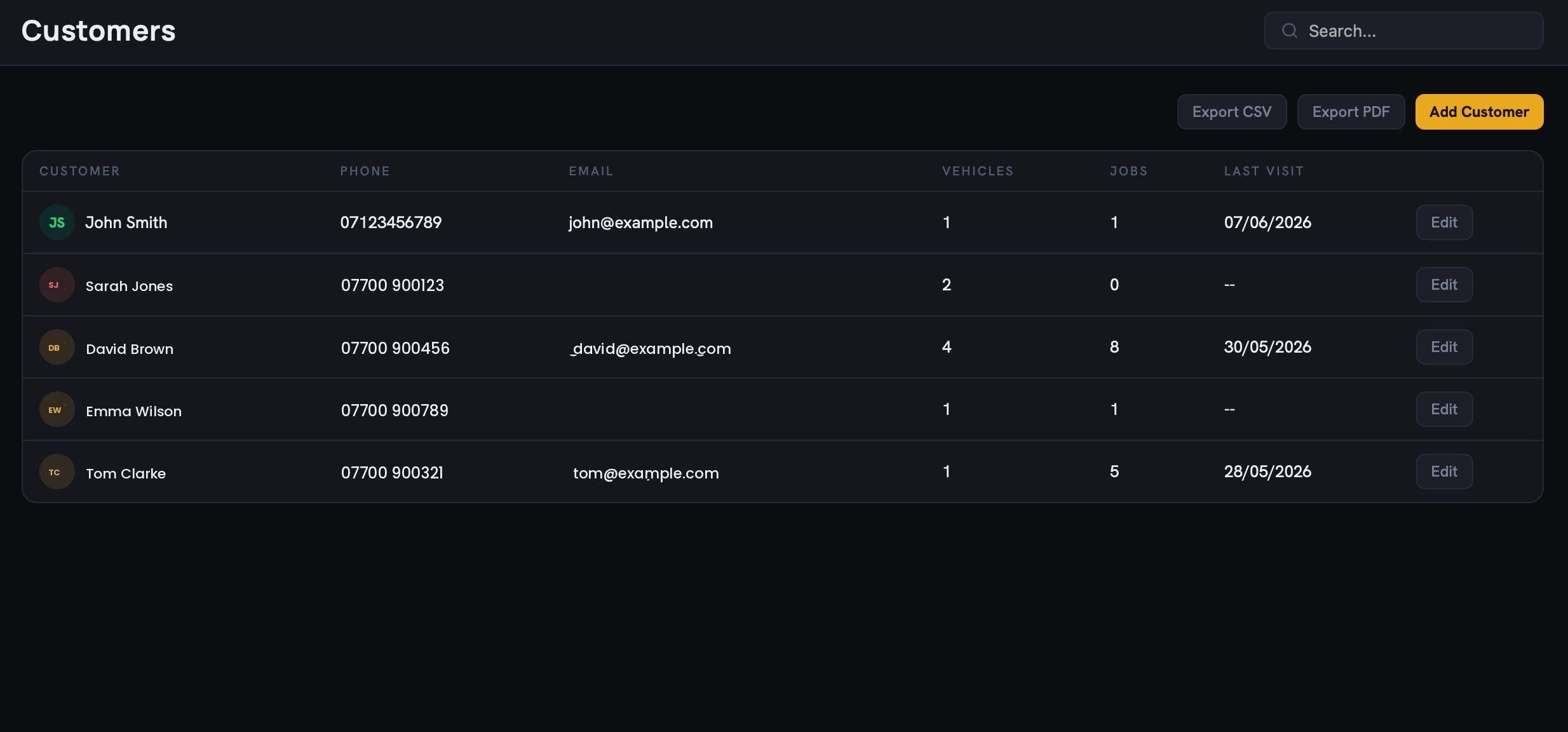
Every customer, their vehicles and visits, together on one searchable page.
Everything else that earns its keep.
The headline three do most of the work. These are the quieter ones the office stops being able to live without by the second week.
Time on the job
Start a timer when the spanner comes out, stop it when it goes down. Actual minutes on every job: for billing, for quoting the next one, for knowing where the day went.
Automations that behave
Set the rules once, a reminder here, a follow-up there, then leave them alone. They fire on time, in your words, and never need managing.
The right people, the right screens
Admin, manager, accountant, receptionist, tech. Each sees what they need and none of what they don't. Set any page to view-only or full, per person, and hide customer phone numbers from whoever doesn't need them.
Locked, opened in a blink
Face ID or a fingerprint to get in, two-factor if you want belt and braces. Your customer list and your takings, behind the same lock as your banking app.
One site or five
More than one unit? Each site keeps its own rota, its own staff, its own day, and you see the lot rolled up, or one branch at a time.
A booking page that's yours
A branded link customers can book from at 11pm, straight onto your calendar, no phone tag. Deposits optional, your hours, your services.
Quotes that become invoices
Quote a job, win it, and it becomes the job and then the invoice. Same numbers, no re-typing, no "what did we say again?"
One thread per customer
SMS, email and WhatsApp in a single conversation, on the customer's page. Reply from your computer; the whole team sees what was said.
The money, recorded properly
Every payment logged against its invoice, full or part, with who took it, when, and how. A clean ledger, a filterable log, a receipt in one tap.
Numbers, in plain English
Revenue, collection rate, what's overdue, who's busy, and hours clocked against hours actually on jobs, per person. The figures you'd act on, not a wall of charts nobody opens.
Yours to take with you
Export anything to CSV, push to Xero or QuickBooks on a schedule. Your data is yours; leaving is two clicks and a download.
Built for the bay, not the boardroom.
The product was designed in a real workshop in Coventry. Most decisions came from arguing with technicians about what was getting in the way. A few examples follow.
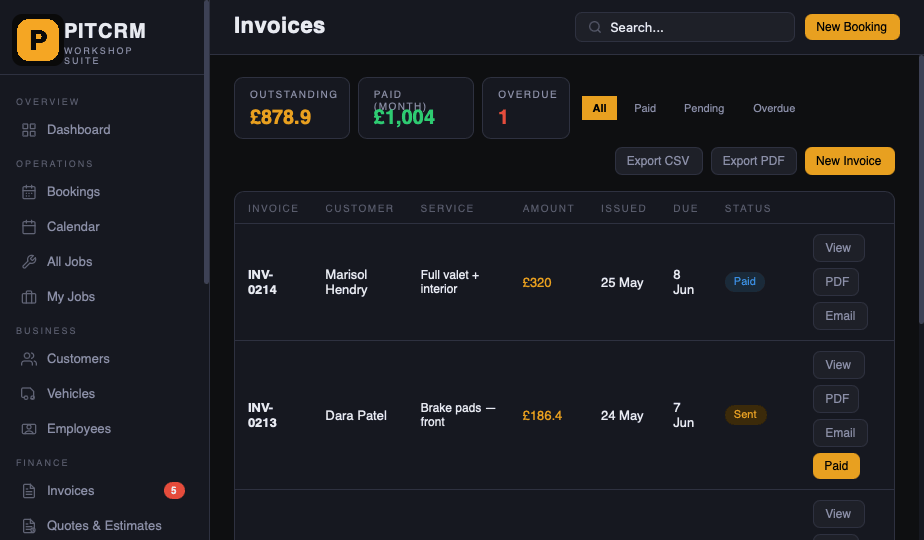
One page for the money side.
The invoice ledger shows what's out, what's in, and what's gone overdue, without a dashboard, a chart, or a sales coach in the corner suggesting you "engage" your customers.
- Filter by status, customer, vehicle or month
- Take a card payment from a saved customer in two taps
- Send a polite chase, or a firm one, in your wording, saved
- Export anything to CSV, push to Xero or QuickBooks on a schedule
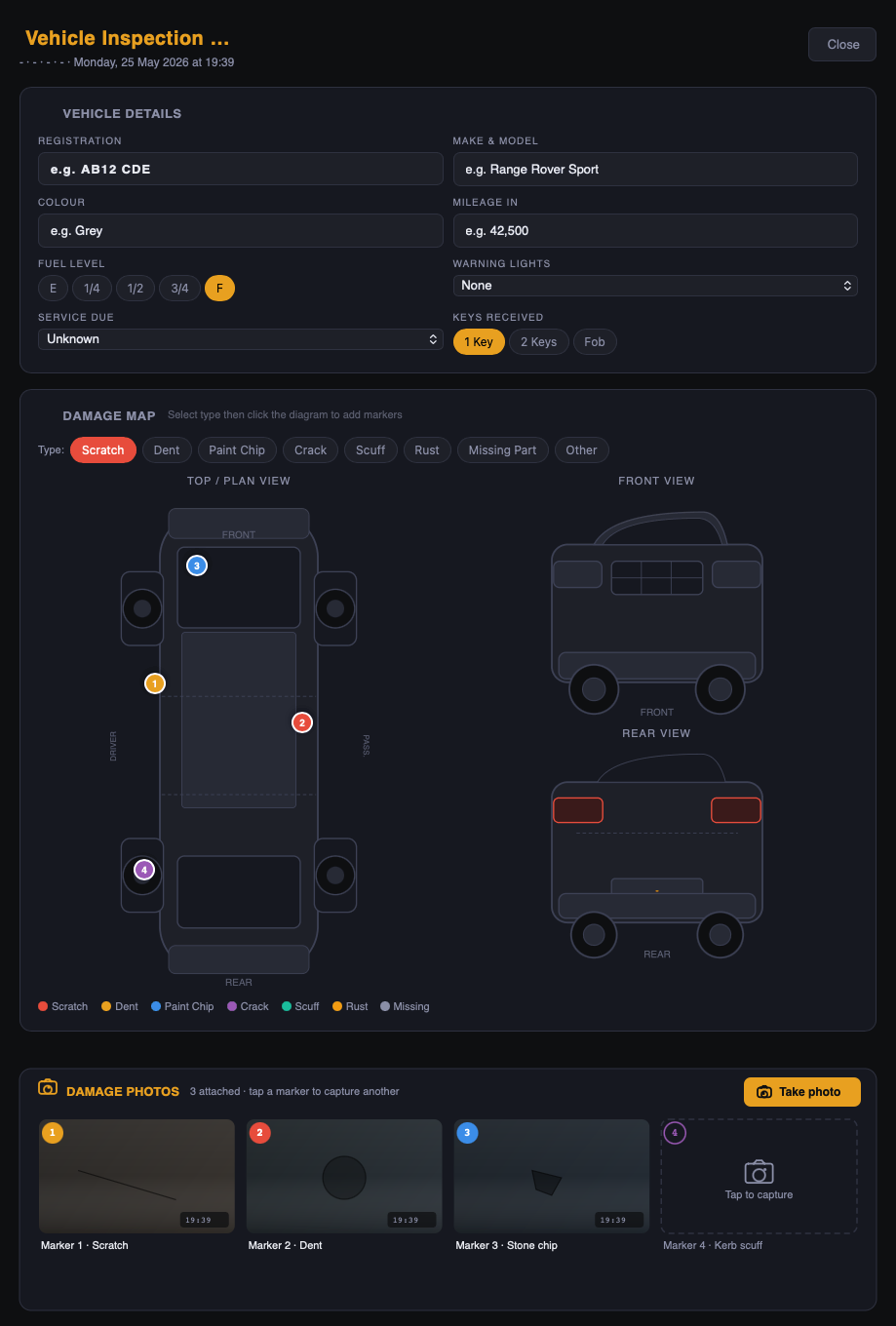
Walk-around damage maps.
Before keys come off the hook, the tech walks the car and taps the damage onto a diagram. Photos attach. The customer gets a copy with the booking confirmation. If a dispute comes up later, you've got it on file, timestamped.
- Tap-to-mark damage on cars, vans, motorcycles
- In-app photos with EXIF preserved
- Customer signs on the iPad before work starts
- PDF report attaches automatically to the job
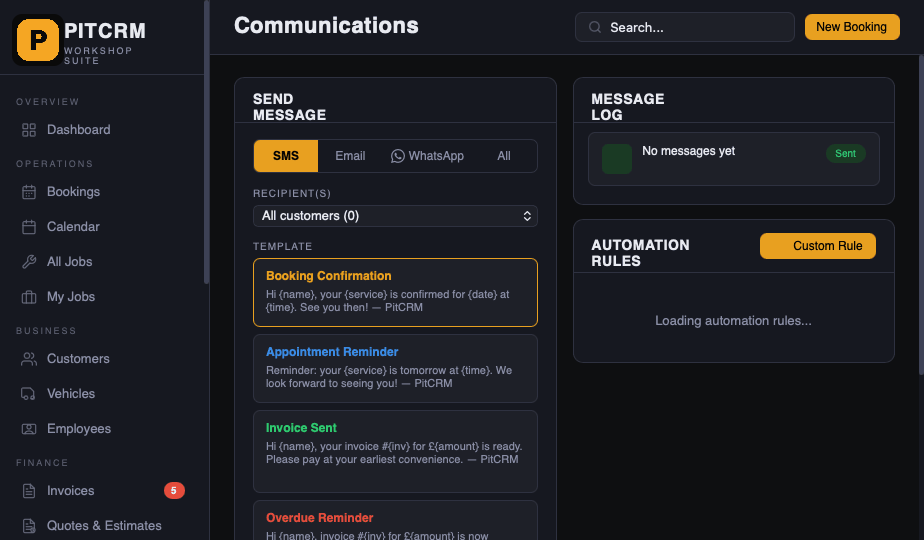
The whole thread, per customer.
Every SMS, email and WhatsApp lives on the customer record, in order. The receptionist who picks up the phone sees what the tech said last Tuesday. The tech sees that someone already promised it'd be ready by 5.
- Reply by SMS from your computer, plus WhatsApp integration
- Send from your own domain & sender ID
- Save templates for the things you say a hundred times
- Optional automations. Set them up, then leave them alone
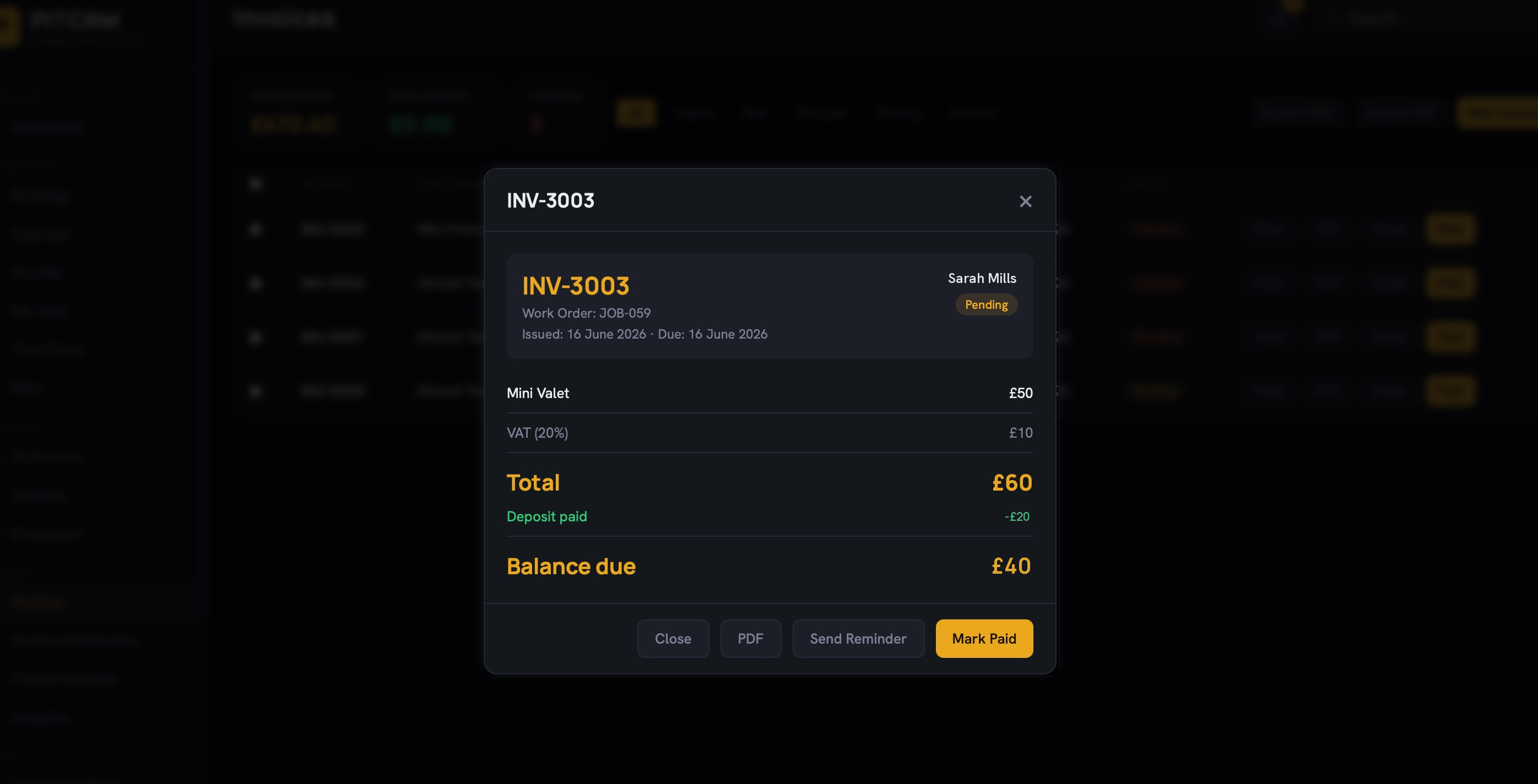
A deposit, taken at booking.
Ask for a deposit when the booking's made and the slot only locks once it's paid. The money goes to your own connected Stripe account, not ours. If they cancel late, keep it or refund it from the booking. No card machine, no awkward phone call.
- Paid straight into your own Stripe account
- Slot held only once the deposit clears
- Refund or retain on a late cancellation, in-app
- Carried over and credited to the final invoice
The week, on one grid.
Lay out who's working when on a single weekly grid, build it from a template, and copy last week when this week looks the same. Staff clock in and out from their phone, and you get planned-versus-actual without chasing timesheets.
- Weekly rota grid: staff down, days across
- Shift templates and copy-week
- Clock in/out and breaks from any phone
- Planned-vs-actual attendance at a glance
Built around four kinds of workshop.
If you look after vehicles for a living, PitCRM is probably shaped around your week already. If you don't, it almost certainly isn't, and that's the point.
Independent
garages.
Servicing, diagnostics, repairs. 2 – 10 ramps, a receptionist who's also doing the books, and a phone that doesn't stop.
MOT
centres.
Class IV, V and VII. DVLA-linked reg lookups, automatic year-out reminder texts, and a digital pre-MOT inspection.
Detailers &
valeters.
Full details, ceramic, PPF. Photo-led job records, deposit-taking online booking, and tidy after-shots that customers actually share.
Bodyshops &
SMART repair.
Estimates with damage maps, courtesy-car tracking, and an invoice ledger that plays nicely with insurer claims.
A short list of things
we politely left out.
Most workshop software grew until the receptionist needed a tutorial. PitCRM was built backwards from that: a short list of things we kept, and a longer list of things we said no to.
We ran the workshop on a whiteboard and three group chats for nine years. This is the first thing my receptionist hasn't asked me to switch off. The MOT reminders alone paid for it twice over in the first quarter.
4 ramps · est. 1986
Class IV & VII MOT
One product, three places it lives.
The office uses the web app. The bay uses the iPad. The owner checks Monday's numbers from the phone over breakfast. All included.
Three plans. Cancel any time.
Thirty days free. £0 today, and cancel in two clicks from settings before it renews. Annual billing saves two months; switch plans whenever you want.
- 1 location · unlimited customers · 100 jobs/mo
- 200 SMS / month · WhatsApp integration
- Bookings & Calendar
- Customers, Vehicles & DVLA lookup
- Jobs, Quotes & PDF Invoices
- Booking portal · Photos · Mobile app
- Pay-as-you-go overages available
- 3 locations · unlimited customers · 300 jobs/mo
- 600 SMS / month · WhatsApp integration
- Card payments & booking deposits
- Automated follow-ups
- Full analytics & finance reports
- QuickBooks / Xero sync
- Custom branding & templates
- Pay-as-you-go overages
- Unlimited locations, customers & jobs
- 1,200 SMS / month · WhatsApp integration
- Priority support, 2hr SLA (business hours)
- Dedicated onboarding call
- Named account contact
- Custom follow-up templates
Cancel any time. Switch plans whenever you want. Larger group, dealer chain or franchise? Write to support@pitcrm.com.
The honest answers to the usual ones.
How long does it take to set up?
Most workshops are taking real bookings within an afternoon. We'll import your existing customers from a CSV (or from your current software) on the first day if you like, no extra fee, no upgrade required.
Will you replace my paper diary?
Honestly, that's down to you. A lot of our customers still scribble in a diary for a fortnight while they get used to it. Nothing in PitCRM stops you. Most stop on their own after the second week.
Does it do MOT reminders properly?
Yes. We hook into the DVLA database, find the renewal date for every vehicle on your books, and send the customer a reminder by SMS at 30 days, 7 days, and the day before. Your wording, your sender ID.
What about VAT and the accountant?
Invoices are HMRC-compliant out of the box, with adjustable VAT rates per line. Push to Xero or QuickBooks on a schedule, or export to CSV if your accountant has Strong Opinions.
My techs aren't computer people. Will they use it?
They use the iPad app. It shows them the jobs they're on, lets them tick a checklist, take photos, mark damage on a car diagram, and that's about it. If they can use Just Eat, they can use this.
Can I migrate from Garage Hive / Autowork / etc?
Yes. We've built importers for the common ones. If you're moving from something we haven't seen, send us a CSV export and we'll write the mapping, usually within a day or two.
What if I don't like it?
Cancel any time, from the settings page, in two clicks. No phone call to a retentions team. We'll email you a CSV of everything you put in.
Where is my data?
In London. AWS eu-west-2. Encrypted at rest, backed up nightly to a second region, GDPR-compliant, and ours alone. We don't sell it, share it, or train anything on it.
Open the diary.
Run your week.
Thirty days free, £0 today. Bring a CSV or start from scratch. By the second Monday morning, most workshops are running the whole day through it.